Español · English
MultiDrive
One drive. Many clouds.
MultiDrive aggregates several cloud storage services —S3, Backblaze B2, Cloudflare R2, Storj, Nextcloud/WebDAV, Google Drive, OneDrive— into a single volume with RAID-like semantics and zero-knowledge encryption. The goal was for it to mount as just another system drive on Windows and Linux, and it already does. On Android there is an app, and the volume shows up inside the phone's Files app: below is exactly what has been tested and what hasn't.
If RAID turned several unreliable disks into a reliable volume, MultiDrive does the same with several cloud accounts: no provider holds your complete data, none of them can read it, and one of them going down doesn't leave you without a volume.
Try it
The Android app is in Google Play internal testing: you don't find it in the store, you get in by invitation. Leave your address and we'll add you to the list.
The invitation is not instant: the list is added by hand.
When it arrives, open it on the phone and accept from there. You need Android 8 or later and
an arm64 phone, which is what they all have had for years. The
interface is in Spanish only.
Your address is used only to add you to that list. It is kept on this same server, given to nobody, and there is no newsletter. To come off it, write to gerencia@jlsoltech.com. It is spelled out in the privacy policy.
And on Windows
No waiting list there: you download it and install it.
Download for Windows 15 MB · 64-bit Windows · bundles WinFsp, which is what makes the volume show up as a system drive
It is unsigned, so Windows will warn that it doesn't
recognise the publisher: More info → Run anyway. So you don't have to take
our word for it, the sha256 is in the release
notes, along with a plain .msi for people who already have WinFsp.
Would you rather build it yourself? The whole source is in the repository, with instructions.
In thirty seconds
It has background music, but it reads fine without sound: it tells the story with on-screen text, so you miss nothing watching it in silence and no captions are needed. It doesn't play by itself either: until you hit play, only the file's header travels, not the video. And if you'd rather read, everything below is written out in more detail than fits in half a minute.
On the phone
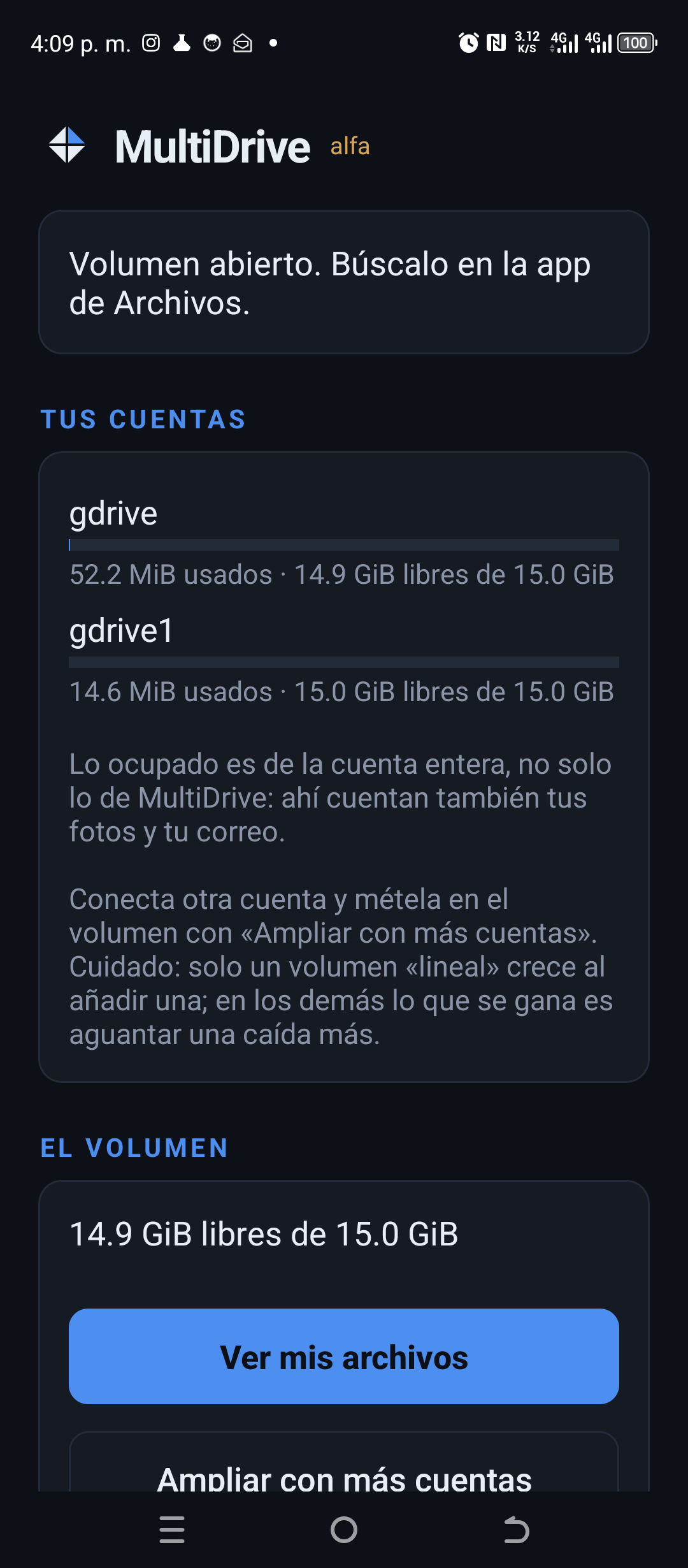
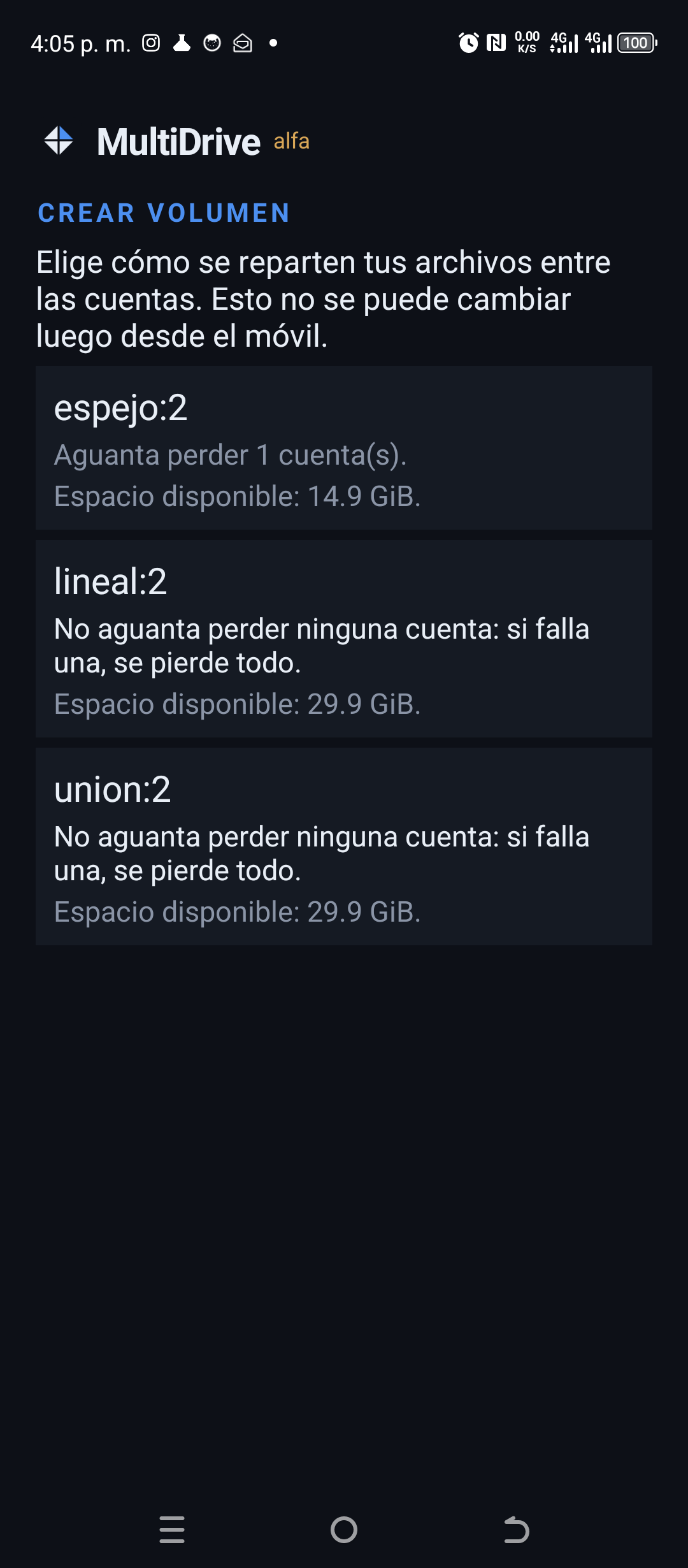
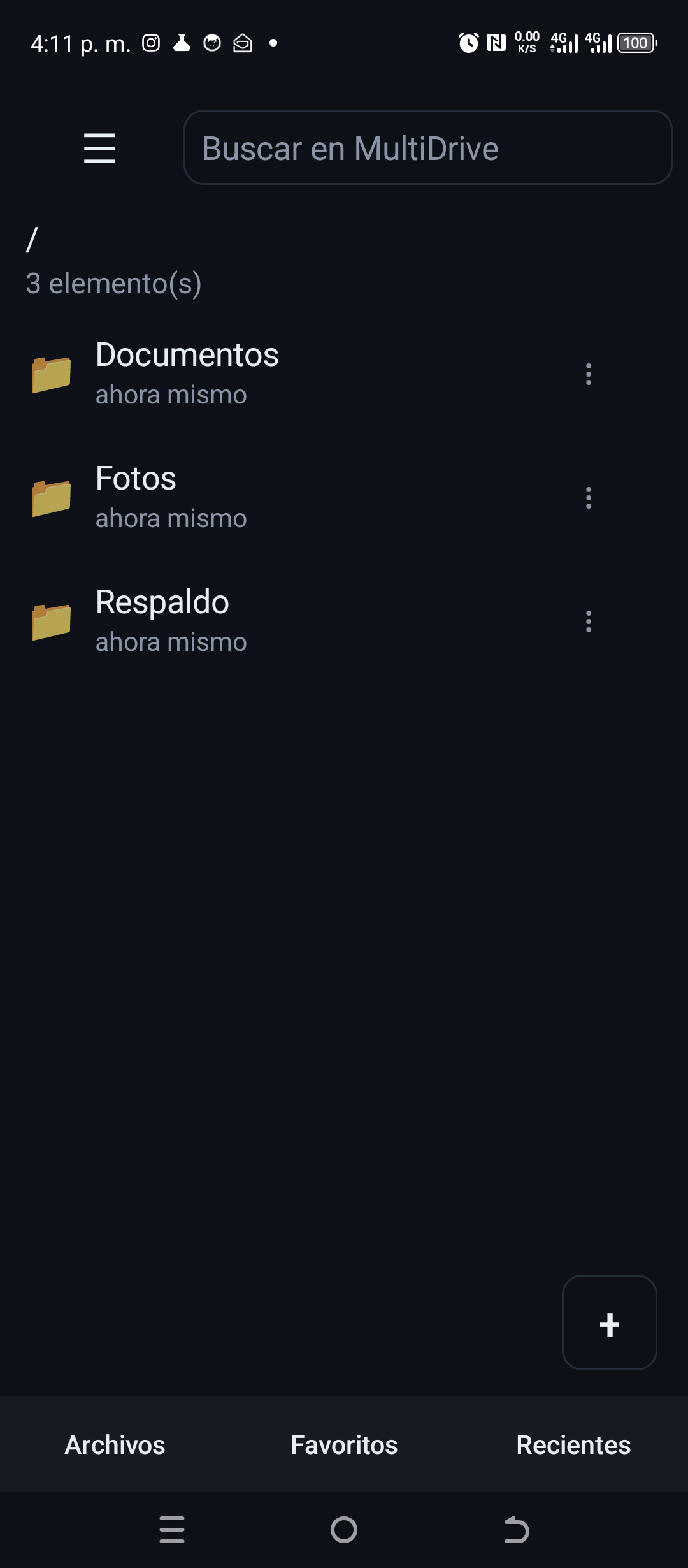
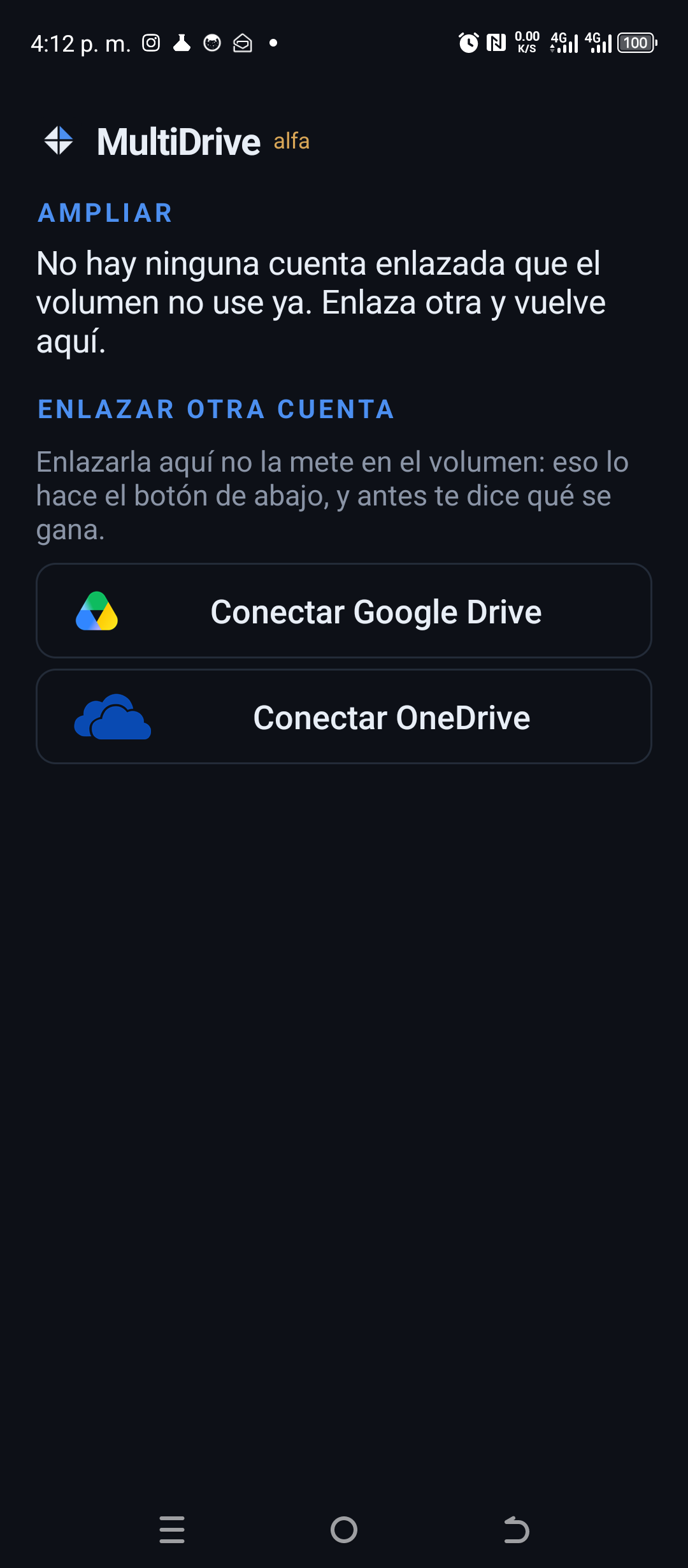
Real screenshots, taken on a handset running the published build. Not mocked up and not retouched: what you see there is what you get.
What it works with
Your accounts, the ones you already have. MultiDrive hosts nothing: it talks to them directly and turns them into a volume.
 Google Drivetested
 OneDrivetested
 Amazon S3B2 · R2 · Wasabi · MinIO · Storj
 Nextcloudand any WebDAV
 Local foldera disk or a NAS
 Dropboxon the way
 Boxon the way
 MEGAon the way
- Tested end to end against real accounts
- Works today
- In upcoming versions
Mixing types is normal, and it is the whole point: one volume can live on a Drive, a OneDrive and an S3 bucket at the same time. The names and logos are trademarks of their owners and appear here only to say what MultiDrive talks to; none of them sponsors it or is affiliated with it.
Status
Works and is tested
- Per-chunk encryption. XChaCha20-Poly1305 with an Argon2id key, filenames included
- Five topologies. Reed-Solomon
k+m, mirror, union, concatenation and linear, the only one that adds up uneven capacities - It mounts as a drive. WinFsp on Windows and FUSE on Linux, read-write: Explorer lists folders and any program opens files
- Desktop interface. Add providers, create the volume, mount it, check its health, see how much room is left in each account, grow it with one more account and remove one
- It lives in the system tray. Closing the window with the drive mounted hides it there instead of unmounting; with nothing mounted, closing closes
- Linking a cloud account is one button. The browser opens, you sign in to your account and grant permission; your credentials never pass through MultiDrive. Google is asked for access only to the files MultiDrive creates, not the rest of your Drive
- Switching machines without linking account by account. The configuration is stored encrypted with your passphrase in your own clouds, next to the volume. On the new machine you link one account and the rest come from there. No servers of ours in the middle
- Rebalancing. Add or remove providers choosing what to prioritise, without losing the ability to read the volume meanwhile. Removal works even if the account no longer answers
- Growing a
linealvolume costs what the new account contributes. Adding a 15 GB account to a 1 TB volume moves about 15 GB, not the terabyte: only the newcomer's share changes place, and the volume stays readable throughout - Deferred writes with a journal. Writing returns immediately and a background thread uploads; a root pointing at chunks that are not up yet is never published
- In-memory and on-disk caches. The disk one stores chunks encrypted and survives reboots. Re-reading 7.6 MiB goes from 2,718 ms to 23 ms
- Windows installer that brings WinFsp, plus a service: the drive connects from Explorer and Windows asks for the passphrase, which is not stored
- Rescue. If the root pointer is lost, the volume is rebuilt by enumerating and decrypting whatever is left at the providers
- Google Drive and OneDrive pass the conformance suite against real accounts, and there is a real volume tested end to end across both
- Android app. The same core, compiled for the phone. It creates volumes and opens them, shows up in the system Files app as one more storage location, brings its own file browser with search and favourites, reads, writes, renames and deletes, and receives files from any app's share sheet. It is in internal testing on Google Play, tried on three different phones
- Volumes are created, grown and deleted from the phone. Before growing one it
says what you gain, which is not always space: only a
linealvolume grows when you add an account; in the others what you gain is surviving one more failure - It says how much is left, with a bar per account. What it shows as used is the whole account, not just MultiDrive, and the screen says so
- Automatic upload of phone folders. You pick the folders and the system uploads whatever is new in the background, with a WiFi-only option. For a job that starts on its own to be able to write, the passphrase has to be left in the Android keystore; that is optional, the app says so before you turn it on, and turning it off wipes it
- Reading without downloading the whole file. On the phone, opening a video pulls the chunks the player asks for and not the complete file. That is what separates this from a downloader
Not yet
- There is no stable release. The on-disk format may change without notice. What is on Google Play is internal testing, by invitation: it is not in the store for everyone, and on the desktop there is no published release at all yet
- The Windows installers are unsigned. Windows announces them as coming from an unknown publisher until there is a certificate. The Android app is signed: that is a requirement for uploading it to Play
- No thumbnails on the phone. A photo folder looks like a list of names. And
the app is
arm64only, which is what phones have carried for years, but not all of them - No local index. Walking the tree pays one request per level
- Two machines on the same file, no. This used to say «a single writer» and that is no longer true: two machines touching different files coexist, because whichever arrives second re-applies its change on top of what the first published instead of overwriting it. What remains unsolved is the clash on the same path: there it is rejected and the path is named, rather than picking a winner in silence and losing somebody's work
Measured, not promised
This project leans on measurements against real accounts, not estimates. And also on what did not reproduce when the measurements were repeated:
| On Google Drive, asking for an object that does not exist costs 2.6 times a normal operation | That is its worst case, and it is exactly what checking a volume does. Which is why the check enumerates instead of asking, and goes from weeks to minutes |
| Enumerating costs one request per directory, not one in total | Drive and OneDrive are hierarchical. How chunks are spread across folders has a price that has to be measured before it is fixed |
| No ratio between the two clouds has survived three rounds of measurements | One came out 4.7×, 1.6× and 2.5×; another changed direction. We measure ratios within a single provider, which do reproduce, and distrust the ones comparing two |
The test that matters, run against real accounts: an rs(2,1)
volume spread across Google Drive, OneDrive and a local disk. A file is uploaded, an
entire provider is destroyed, the file still reads back byte-for-byte identical, and
rebuild regenerates the missing shards in 34 seconds. With one honest caveat: it
was 1 MB, not 10 GB.
What it solves
| My accounts are scattered across several services | A single volume over all of them, encrypted and with RAID |
| If a provider suspends my account, I lose everything | k of n parity: survives losing m providers |
| The provider can read my files | Client-side encryption, filenames included |
| Vendor lock-in | Add or remove providers and the volume rebalances |
About space, choose your topology knowing this. The ones that
spread every chunk across all providers —mirror, parity, union— are limited by the provider
with the least room: the shards are equal in size, so once the smallest fills up nothing more
fits even if the others have room to spare. With 15 GB, 5 GB and 1 TB you get
5 GB mirrored and 15 GB in union. Only
lineal adds up: it puts each whole chunk on one provider, chosen in
proportion to what each one contributes, and with those same numbers gives
1.02 TB. In exchange it adds no margin for failure at all, same as union.
How it works
Immutable chunks
Every file is cut into 16 MiB chunks addressed by their BLAKE3 hash. Copy-on-write: nothing is ever overwritten.
Erasure coding
Reed-Solomon k+m. With rs(4,2) over 6 providers you survive 2 failures at 1.5× overhead.
Client-side encryption
XChaCha20-Poly1305 per chunk, key derived with Argon2id. The provider sees opaque blobs.
Native mounting
WinFsp on Windows, FUSE on Linux. Read-write, with caching and background upload.
And on the phone
On Android there is no mounting: a DocumentsProvider makes the volume appear in the Files app, with its own browser alongside.
Topologies
mode        formula                  survives       overhead
concat      1 of 1                   nothing        1.0×
union:n     n of n                   nothing        1.0×
lineal:n    1 of 1, wherever it goes nothing        1.0×
espejo:n    1 of n                   n−1 failures   n×
rs(k,m)     k of k+m                 m failures     (k+m)/k ×
lineal is the only one that adds up uneven
capacities: it puts each whole chunk on one provider, chosen in proportion to what it
contributes. The others cut every chunk into equal parts, so the smallest one decides. Reading
costs one request instead of n, and adding a provider moves only its own share rather
than the whole volume. It adds no margin for failure.
Those mode names are the ones the program itself takes, and the program is in
Spanish: espejo is mirror and lineal is linear.
What it is NOT
- Not a backup system. restic, kopia or borg are for that.
- Not a system disk, nor a volume for databases. Random 4 KB writes over the Internet have no physical fix. It is for media, archives and warm data.
- Not magic against Terms of Service. Consumer clouds discourage this usage pattern; the first-class providers are the S3-compatible and self-hosted ones.
- Not finished software. There is no stable release —what is on Play is internal testing—, the on-disk format may change without notice, and you should not trust it yet with the only copy of anything.
Like the project? Help me keep building it
MultiDrive is free software under AGPL-3.0: there is no paid tier, no features held back behind a subscription, and no ads. If you find it useful and want it to keep growing, you can chip in.

Opens on Ko-fi, who handle the payment. You'll see the methods and amounts there.

LuisMora78.
426WwUxyLAbEAvzxcaLgofXf9xu4E7qEagGGdqPHkbDddHk36XdpGFf9U1Kc8N5DuAAzAYN5PStwtLj2zhKcuNm1KLH2bxcChipping in is entirely optional and unlocks nothing: what exists, exists for everyone alike. What it does do is pay for the server and buy time to keep going.